Caught at the Window AI Ad Generator
Create a two-person Caught at the Window AI Ad from a product photo. Add optional portraits and a brand logo; the scene is ready.
Create your ad
12 seconds · 9:16Each role without a photo uses a fictional adult.
JPG, PNG or WebP · up to 10 MB each
Sign-in and paid credits required. Confirmed failed generations return credits.
Image requirements & privacy
Product and portrait images: at least 300 px per side. Logos: at least 32 px per side. Up to 40 megapixels each. Your draft stays in this browser tab until you submit; images are resized before submission. Use products, artwork and adult portraits you have permission to use. Read the privacy policy.
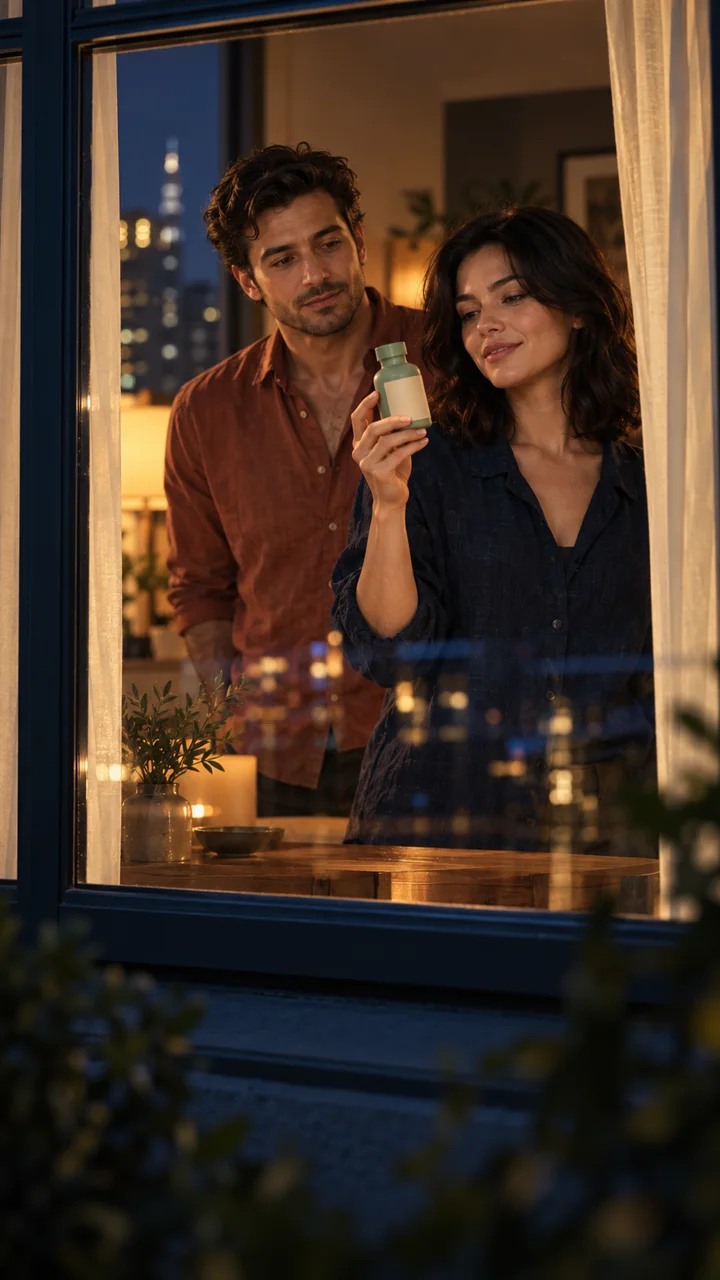
Their Undivided Attention.
Illustration of the setting, not a generated video. Your ad will vary.
A Small Story With a Brand-Sized Ending
A Caught at the Window AI Ad follows curiosity, discovery, reaction and reveal. Movement and timing can vary.
- 0–3 s01
One Window, All Eyes
A gradual zoom toward a warmly lit apartment opens your AI window commercial. The camera stays outside, with the window frame in view.
- 3–6 s02
Your Product Takes the Lead
Two people interact inside. Person 1 presents your product while Person 2 reacts alongside. A front-facing product photo helps keep the packaging and colors recognizable.
- 6–8 s03
The Caught-in-the-Act Look
Person 1 notices the camera and pauses. Person 2 follows the gaze toward the window. This shared reaction gives your AI window commercial its caught-in-the-act moment.
- 8–12 s04
Close With Your Brand
Person 1 sets down the product and closes the curtains while Person 2 stays behind. Add a brand logo for the last two seconds, or finish your AI curtain ad on closed curtains.
A Product Photo That Holds Up Close
Choose one product photo showing the entire item, with its label facing the camera. Use even light and a simple background. Avoid collages, competing products, cropped packaging and reflections that hide the label.
A bottle, cosmetics jar, packaged snack or small accessory gives an AI window commercial a clear focal point. The person holds and presents the item, rather than automatically eating or drinking it.
The product photo guides appearance, but packaging and small text can vary. Check the label, cap, handle and silhouette throughout the clip before publishing.
Two People, Two Distinct Roles
Cast Person 1 as the lead who presents the product and closes the curtains. Cast Person 2 as the companion who reacts alongside. Each portrait guides the complete person, including visible clothing, accessories and colors.
The Caught at the Window AI Ad uses two fictional adults when no portraits are supplied. Add just Person 1 or Person 2 to cast that role; the other stays fictional. Add both to cast both roles. One product photo is enough to begin.
Choose one consenting adult per portrait, preferably from the waist or knees up, with a clear face and visible outfit. No apartment image is needed, and no relationship or gender pairing is required.
Likeness, hands and clothing can vary. Review both people throughout the interaction before sharing. The Caught at the Window AI Ad is a fictional advertisement, not a recording of a real event.
A Brand Logo Worth the Last Look
Upload a separate brand logo for a branded finish. A transparent PNG works well; JPG and WebP are also accepted. Use sharp artwork without surrounding screenshots. Your brand logo keeps its proportions in a centered, flat panel.
The final two seconds of your AI curtain ad show the logo as a flat panel, without fabric distortion. Check white lettering, transparent edges and long taglines in your uploaded artwork.
For ads with a brand logo, return here to finish and save the video. Keep this tab open during finishing; if you leave, resume from My videos without another charge. Browser support is checked before submission.
Twelve Seconds, Ready for Your Review
The Caught at the Window AI Ad Generator creates a 12-second vertical clip with two adults, generated ambience, a curtain swish and original musical ending. No prompt writing is required. Exact timing and motion vary.
Basic offers 480p/720p; Pro also offers 1080p. The default, Basic at 480p, keeps the complete duration at the lowest starting quote. Choose your settings to see the price. Sign-in and paid credits are required; confirmed failed generations return credits.
Download the MP4 and review the product, both faces, hands, sound and brand logo. Check your social platform’s crop and controls. Add offers or a call to action in your preferred editor, and ensure the advertisement represents your product accurately.
Before you make your window ad
What do I need to upload?
The Caught at the Window AI Ad Generator needs one product photo. Up to two adult portraits and a brand logo are optional. Use JPG, PNG or WebP up to 10 MB each. Product and portrait images need at least 300 px per side; a logo needs 32 px per side. Images are resized before submission.
Do I have to write a prompt?
No. The window scene, product presentation, reaction and curtain ending are already directed. Upload a product photo, review the settings and credit quote, then generate your ad.
Will the product and both people look exactly the same?
Your references guide the product and each complete person, but details can vary. Check both identities, outfits, packaging and hand contact before publishing. A sharp product photo and well-lit portraits help make those details easier to follow.
What happens if I do not add a logo?
The AI curtain ad ends on the closed curtains. No new brand logo, slogan or brand name is invented for the ending. Add your original artwork if you want a branded closing panel.
Can I use the video as an advertisement?
Use product images, a brand logo and likenesses you own or have permission to use. Review the result for inaccurate packaging, misleading claims or unintended brand associations. Apply the AI-content disclosures and advertising rules of the platform where you publish. The scene should not be presented as real surveillance footage.