Choose one photo
Upload your picture and check the thumbnail. You can replace or remove it. The dance video preview is scene inspiration, not your generated result.
One photo. Two versions of you. Dance side by side for 11 seconds: your own outfit on the left, a floral wrap dress on the right. Original music included.
JPG, PNG or WebP · up to 10 MB · one person, face and outfit visible
Paid credits required. Confirmed failed generations return credits.
Your photo guides both complete dancers. Your outfit stays on the left; a long floral wrap dress and bare feet belong on the right. Likeness and synchronization may vary.
Use your own portrait or an adult subject you have permission to animate. Minimum 300 px on each side; up to 40 megapixels. Your draft stays in this browser tab and is sent for generation when you submit. The photo is resized before submission. Read the privacy policy.
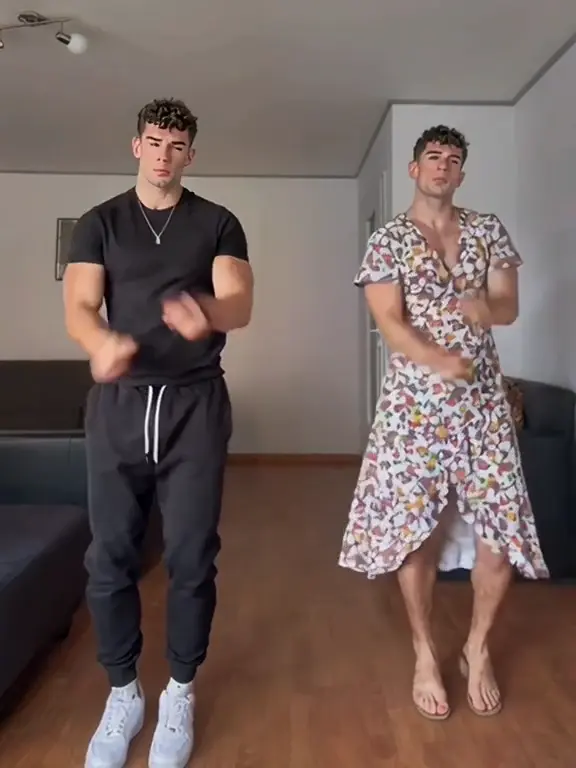
The Abra Kadabra AI Dance Generator makes a living-room twin dance using one identity. You begin alone, your second version joins from the right, and both follow the routine together. One photo supplies both dancers.
Your photograph guides the complete person: face, hair, skin tone and body proportions. On the left, the dance video also follows your visible clothes, accessories and footwear. On the right, your twin wears a long floral wrap dress and dances barefoot. The floral dress is an intentional costume change; the two faces should still look like the same person.
The living room, framing and routine are already chosen. No filming, dance practice or prompt writing is needed. Exact likeness, clothing details and synchronized movements can vary in your twin dance.
Upload your picture and check the thumbnail. You can replace or remove it. The dance video preview is scene inspiration, not your generated result.
The left side uses your photo’s outfit; the right uses the floral dress and bare feet. Basic and 480p are selected first. Basic also offers 720p, while Pro adds 1080p. Changing either setting updates the quote and keeps the 11-second routine.
Sign in and review the credits before generating. When the take is ready, watch both dancers and download the MP4. Submitted videos are available in My videos, so you can return later. A new take uses credits again.
Your Abra Kadabra dance video keeps the background music from the scene preview, including its original rhythm and melody. The same soundtrack is included when you play the finished take and download it. You do not need to upload an audio file or choose a replacement beat.
Unmute the preview before creating your twin dance. Your photo does not record or clone your voice. Check the finished dance video against the beat; gestures may drift from the reference timing.
Watch the whole Abra Kadabra AI dance rather than judging a single frame. Compare the opening face with both faces after the entrance. Check that the left outfit stays consistent, the floral dress remains on the right and the dancers keep separate arms, hands and legs.
Check crossed hands, turns and matching gestures throughout your twin dance. A clearer full-body photo can help guide another take if clothing is unrecognizable, without guaranteeing a specific result.
Save the 3:4 MP4 before editing your dance video. Narrower crops can cut off a dancer or feet. Check the destination app’s crop and controls; this tool does not publish for you.
No. One authorized adult photo supplies both dancers in your Abra Kadabra AI Dance Generator video. This twin dance uses one identity, with the entrance, routine and two looks already selected.
The left dancer follows the clothing and visible accessories in your photo. The right dancer wears the scene’s long floral dress, barefoot. Both use your face, hair and body proportions. Unseen details may be filled in, and exact fabric colors, patterns and likeness can vary.
Yes. Your Abra Kadabra dance video includes the scene preview’s original background music in the downloaded MP4 as well as playback. It is not replaced by a newly generated song. Make sure your intended use of the music follows the destination platform’s rules.
Generation requires sign-in and paid credits. The current quote appears before submission. Confirmed failed generations return credits; a completed dance video with appearance or synchronization differences is not automatically a failed job. Check a pending or review-needed status before creating another take.
Yes. Submitted takes are in My videos. This tab keeps a photo draft when browser storage is available. If refreshing fails, use Refresh status before submitting again. Keep this tab open if the draft could not be saved.